Partner product · Pilot stage
The order is accepted. Why are you still preparing the delivery by hand?
The buyer chooses a courier and a delivery point before Shopify checkout. You handle orders and create waybills from a single dashboard, depending on the active integrations.
The problem
The order is in, but it is not ready to ship yet.
With cash on delivery, a parcel goes to a specific courier office or parcel locker. When the store does not ask for it before payment, the order arrives with an address or a note from the buyer. Someone on the team confirms the office, opens the courier's system and retypes the name, phone, delivery point and amount into the waybill. Then they copy the waybill number back into the order.
Each of these steps is done by hand, one order at a time. As volume grows, so do the handling time and the room for mistakes. FULFILLEGY moves the delivery choice before payment and brings the rest of the work into one dashboard.
Today
- Office choice: the buyer describes it in their own words or says it on the phone. The name has to be found in the courier's list.
- Phone: it is written in different formats and gets corrected before the waybill.
- Waybill: the details are retyped into the courier's system, one order at a time.
- Tracking number: it is copied back into the order by hand.
- Unclear result: the courier does not answer in time and nobody knows whether the waybill exists. A second attempt can create a duplicate shipment.
- Cash on delivery: the amount sitting in parcels that are still on the road is tracked separately.
With FULFILLEGY
- Office choice: the buyer searches for an office or locker by town, name or address and picks it from a list before payment.
- Phone: it is accepted as 0888…, +359… or 00359… and stored in one format.
- Waybill: you tick the orders and create the waybills in one go, on the account of the courier the buyer chose.
- Tracking number: it is saved to the Shopify order together with the tracking link.
- Unclear result: the shipment goes to “Shipment review” instead of being created again. Clicking twice does not create a second waybill.
- Cash on delivery: the home page shows the amount to collect in shipments that are not closed yet.
A delivery form before Shopify checkout
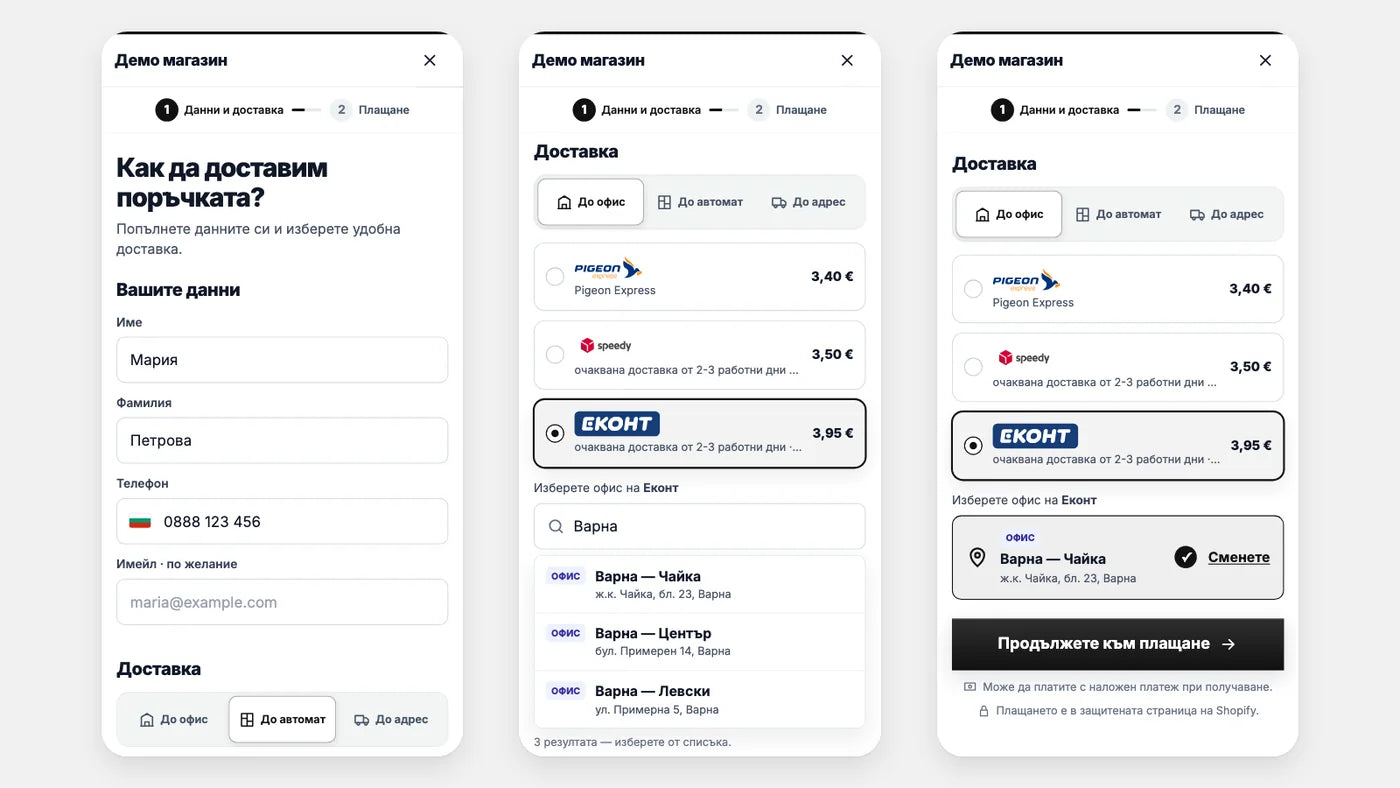
In supported themes the order buttons in the cart and “Buy it now” open a form on top of the store. The screen shows three states of that form on a phone: the buyer's details, the courier choice with office search, and the selected office with the “Continue to payment” button. Everything the buyer sees is in Bulgarian.
- Details: first name, last name and phone. Email is optional unless you make it required.
- Delivery: to an office, to a parcel locker or to an address, with the price of each method.
- Search: the office is found by town, name or address.
- Payment: Shopify checkout opens with the details filled in. The buyer chooses cash on delivery or another available method and completes the order there.
How it works
From setup to tracking
You switch on the delivery form
In the theme editor you enable “FULFILLEGY Pre-checkout” and save. The theme code is not changed. During setup you check the order buttons of your own theme.
You connect the courier and set prices
You enter the credentials of your own courier account and the app checks them on save. You set a price for each method. FULFILLEGY creates shipping rates with the same names and prices in Shopify, in the “Bulgaria” zone.
The buyer orders
They fill in the form, choose a delivery method and continue to Shopify checkout. Only the rate of the chosen method stays visible there. The order is completed in Shopify.
Waybill and tracking
You tick the orders and select “Create waybills”. Labels download as PDF. The tracking number and link are saved to the Shopify order, and the courier's statuses appear in its timeline in FULFILLEGY.
What needs action today
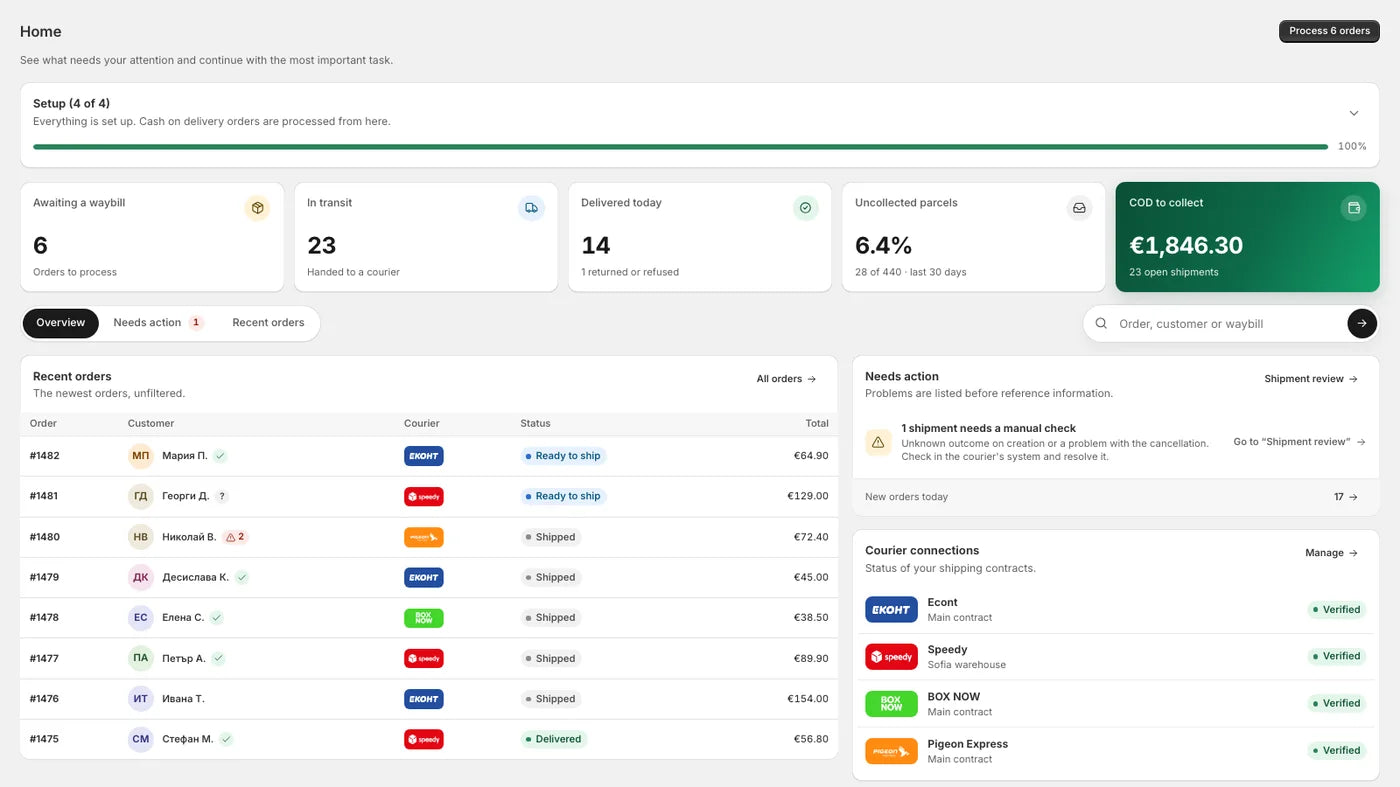
The dashboard's home page. On the screen: completed setup, the numbers for the day, recent orders, one shipment that needs a manual check and the state of the courier accounts. The data is demo data.
- Numbers for the day: orders waiting for a waybill, shipments in transit and delivered today.
- COD to collect: the cash-on-delivery amount in shipments that are not closed yet.
- Uncollected parcels: the share of refused and returned parcels over the last 30 days.
- Needs action: problems are listed before reference information.
Waybills for many orders at once
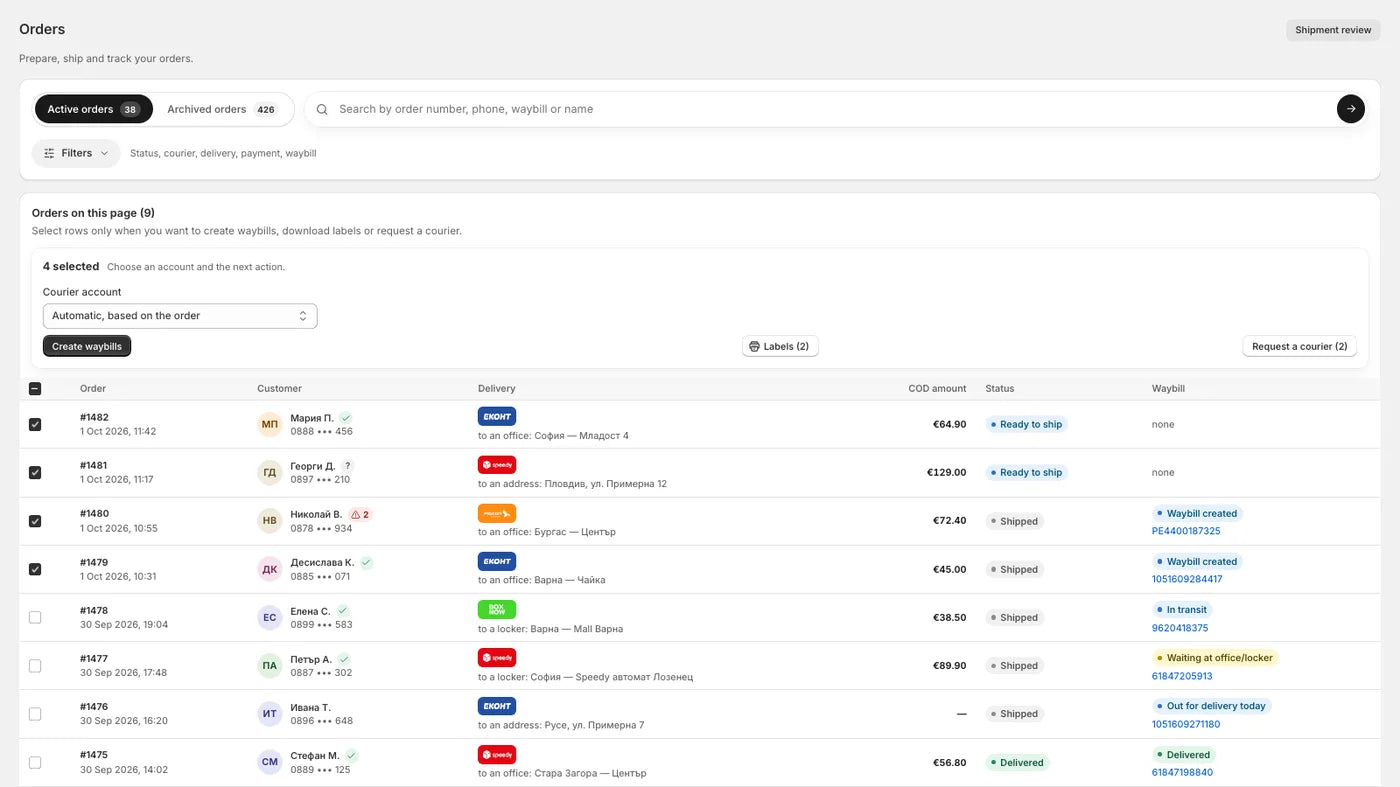
The orders list. On the screen: four ticked rows and the action bar with “Create waybills”, “Labels” and “Request a courier”. Each order shows the courier, the delivery point, the cash-on-delivery amount, the status and the waybill.
- Bulk creation: up to 100 orders in one action. Each one uses the account of the courier the buyer chose.
- Labels: PDF for the ticked orders.
- Courier pickup request: for the ticked shipments, with the couriers that accept such a request.
- Search and filters: by order number, phone, waybill or name; by status, courier, delivery and payment.
The whole shipment on one page
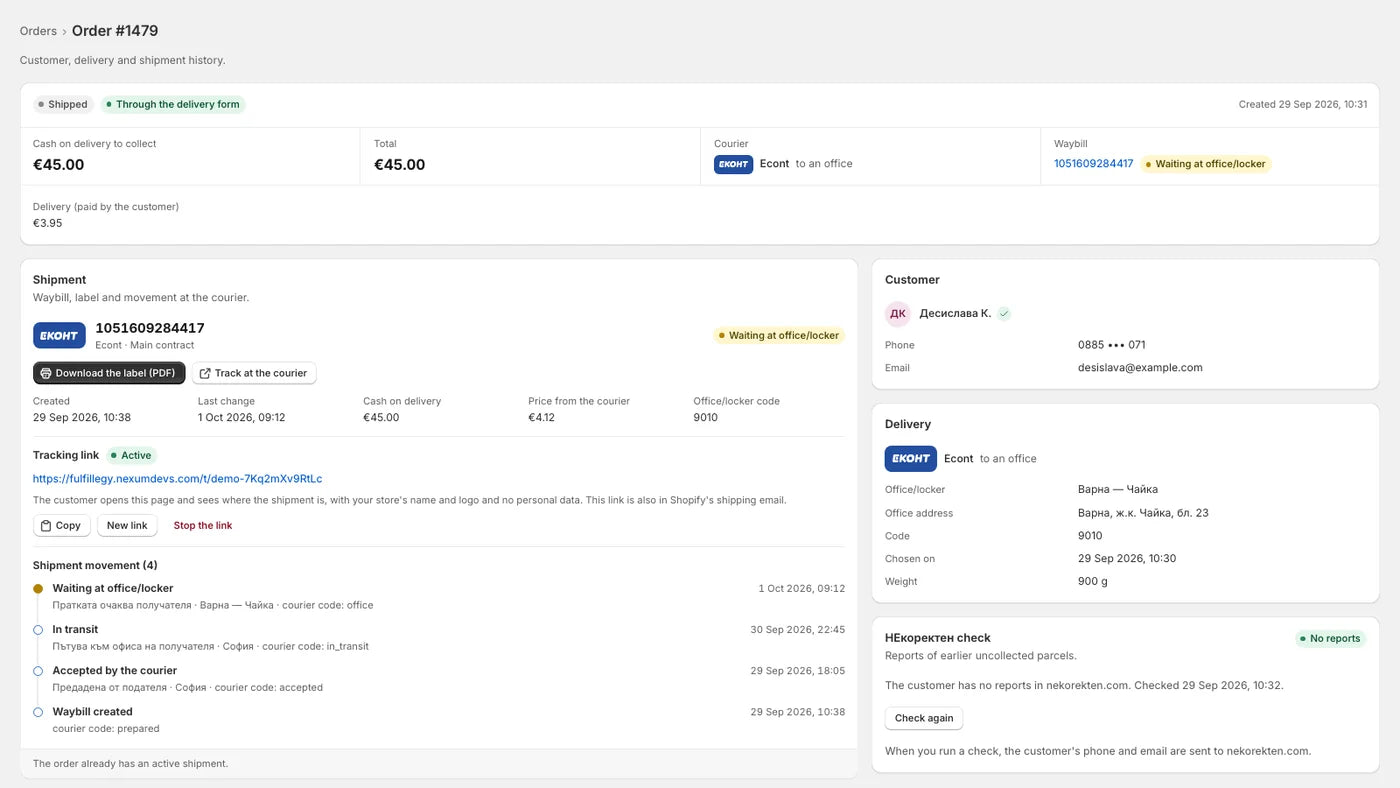
The page of a single order. On the screen: the amount to collect, the waybill with a label button, the tracking link in the “Active” state, the shipment movement with four events, the customer and the chosen office. The nekorekten.com check card shows demo data; see “Current stage” for that service.
- Waybill: number, status, the courier's price and the “Download the label (PDF)” button.
- Tracking link: a page with the store's name and logo and no personal data. You can copy it, issue a new one or stop it.
- Shipment movement: the courier's statuses with date and time.
- Cancellation: the waybill is cancelled from the order page. This also cancels the fulfillment in Shopify.
Also in the dashboard
The rest of the work around cash on delivery
Everything lives in the Shopify admin. The admin dashboard is in Bulgarian and in English.
Courier accounts
You connect your own account and can add more than one courier. The connection is checked on save. An account can be in a test or a live environment.
Delivery and rates
A price for each method and a free-shipping threshold. Every enabled method has a shipping rate with the same name and price in Shopify.
Shipment review
A queue for unclear courier responses, rejected waybills and cancellation problems. You resolve each shipment after checking in the courier's system.
Cash-on-delivery rules
The app places cash on delivery first among the payment methods. You can hide it below or above a given order total.
Order without a chosen office
If the buyer reaches checkout without going through the form, the order is flagged for review. With the block enabled, they can pick an office on the Thank you page.
V.I.P offers
Optional: an offer for one more product at a discount, in the delivery form and on the Thank you page. You set the discount. The offer has no countdown timer.
Who it is for
When FULFILLEGY is the right tool and when it is not
Not for you if
- You have no courier contract. FULFILLEGY works with your account and is not a shipping intermediary.
- You expect the app to collect or transfer money. The courier pays out the cash-on-delivery amounts to you.
- You are looking for a replacement for Shopify checkout. The buyer completes the order in it.
- Your buyers need another language. The delivery form is in Bulgarian only.
- You ship mainly outside Bulgaria.
A good fit if
- Your store is on Shopify, ships within Bulgaria and sells in euro.
- You accept cash on delivery and parcels go to an office, a parcel locker or an address.
- You have your own courier contract and want the waybills created on it.
- You want orders, waybills and statuses inside the Shopify admin.
- You are willing to take part in a product at pilot stage.
Current stage
The product is at pilot stage. Supported couriers, features and access conditions are confirmed for each release. Not all integrations have been validated with real shipments.
The code contains courier connections for Econt, Speedy, BOX NOW and Pigeon Express. According to the product documentation they have been checked with test accounts and the couriers' demo environments. This is not a promise that each of them is available for your store.
- The checks that need a real shipment are marked as open in the documentation: printing and scanning the label, collecting and paying out cash on delivery, statuses during physical movement.
- The delivery form works with the standard order buttons in supported themes. The buttons of your theme are checked during setup.
- The nekorekten.com check and SMS notifications are present in the interface, but they are switched on separately and are not offered as working until that happens.
- The order of payment methods is applied by Shopify. In some stores cash on delivery may stay below the card option.
- The screens on this page come from the real interface, with demo data.
A separate partner product
NEXUM participates in FULFILLEGY’s development. Cash Runway is a separate product with its own scope and roadmap.
FAQ
Questions before you sign up
Does FULFILLEGY replace Shopify checkout?
No. The delivery form collects the buyer's details and the delivery choice before checkout. Payment and order completion stay in Shopify checkout.
Do I need a courier contract?
Yes. You connect your own account and the waybills are created on your contract and your prices. The courier pays out the cash-on-delivery amounts to you. FULFILLEGY does not hold or transfer money.
Which couriers can I use?
This is confirmed for each release. The courier connections that exist in the code are listed under “Current stage”. Not all of them have been validated with real shipments, so we do not promise a specific courier before it is confirmed for your store.
Does the theme code need to change?
No. The form is enabled from the theme editor. It works with the standard order buttons in supported themes, and the buttons of your theme are checked during setup.
What happens if the buyer skips the form?
If they go straight to checkout, for example through accelerated checkout or a direct link, Shopify shows all rates in its usual way. An order without a chosen office is flagged for review. With the block enabled, the buyer can pick an office on the Thank you page.
Do I need Shopify Plus?
No. The delivery form lives in the theme, and the shipping rates are regular Shopify rates. The Thank you page blocks work on every Shopify plan except Starter.
Where is my customers' data stored?
In the EU: the app and its database are in Amsterdam. Only what the waybill needs is kept. Names, phones, emails and addresses are deleted 180 days after the order's shipments are closed.
When will access be available, and on what terms?
The product is at pilot stage and access conditions are confirmed for each release. Leave your email in the form below and we will write to you when there is news.
Get access updates
This subscription is only for FULFILLEGY. You can unsubscribe from future messages.
Pilot stage